Create your account
Sign up in minutes and start your free 7-day trial, no card required. Your business gets its own account, with its data kept fully separate.
Point of sale and inventory for corner stores, pharmacies, hardware stores, shops and distributorsretail stores, pharmacies, hardware stores and auto lotspharmacies, hardware stores and retail storesretail stores, pharmacies, hardware stores and auto parts storesbodegas, pharmacies, hardware stores and shopsretail stores, pharmacies and hardware storesretail stores, pharmacies and hardware storesretail stores, pharmacies and hardware storesretail stores, pharmacies and hardware storesretail stores, pharmacies and hardware stores: sales, cash register, customers and team in a single platform. Configured around your operation and easy to use from your register computer and your phone.
Every business, in its own account. Its team works by roles and its data stays separate. Cuentas Claras operates in 10 markets, with plans and pricing in each market's currency.
No card, no commitment. Prefer to look first? Open the live demo — no sign-up needed.
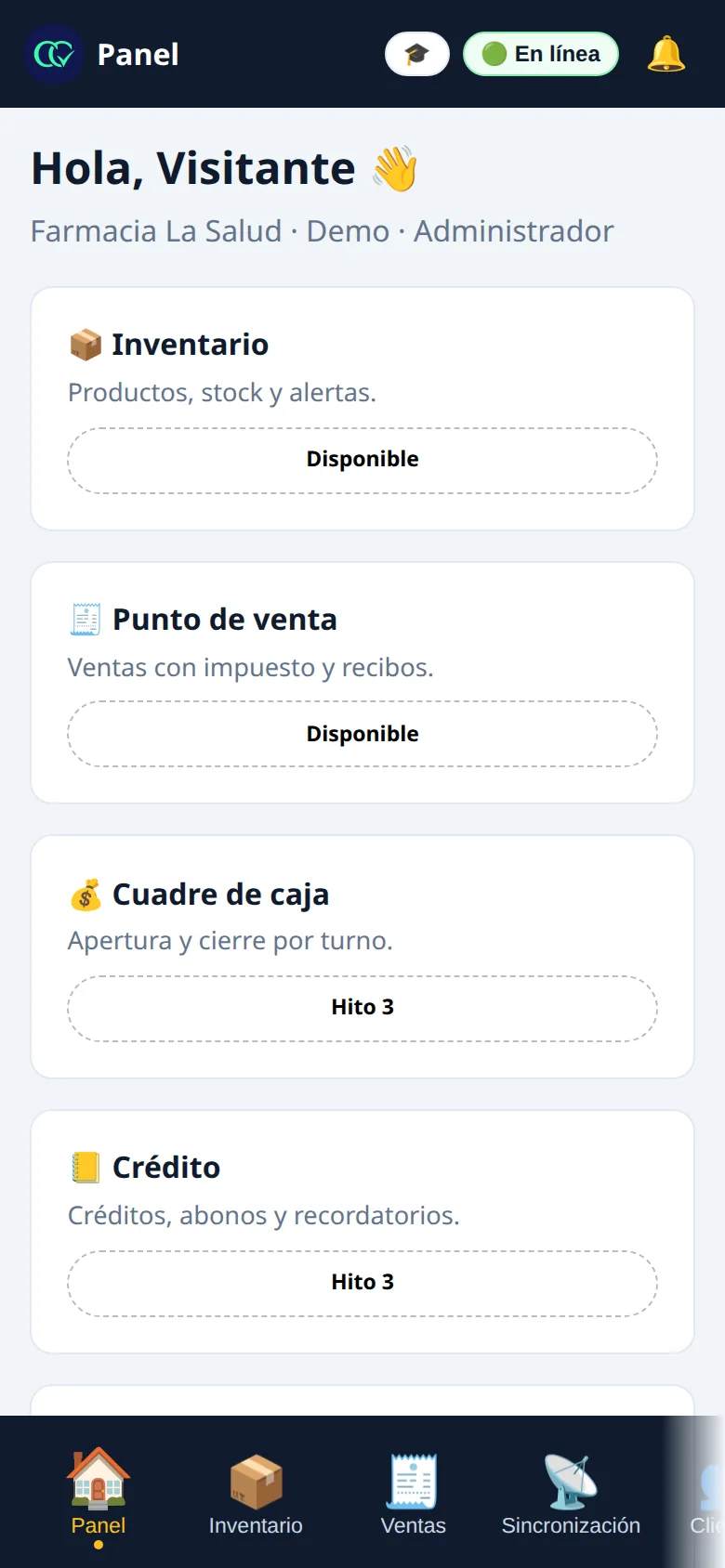
Open a sample pharmacy with demo data and the real app: ring up a sale, watch the inventory go down, and check the day's cash-register closeout. No email, no card, no commitment.
Cuentas Claras is designed to connect what you sell, what you have, what you collect, and who makes each move.
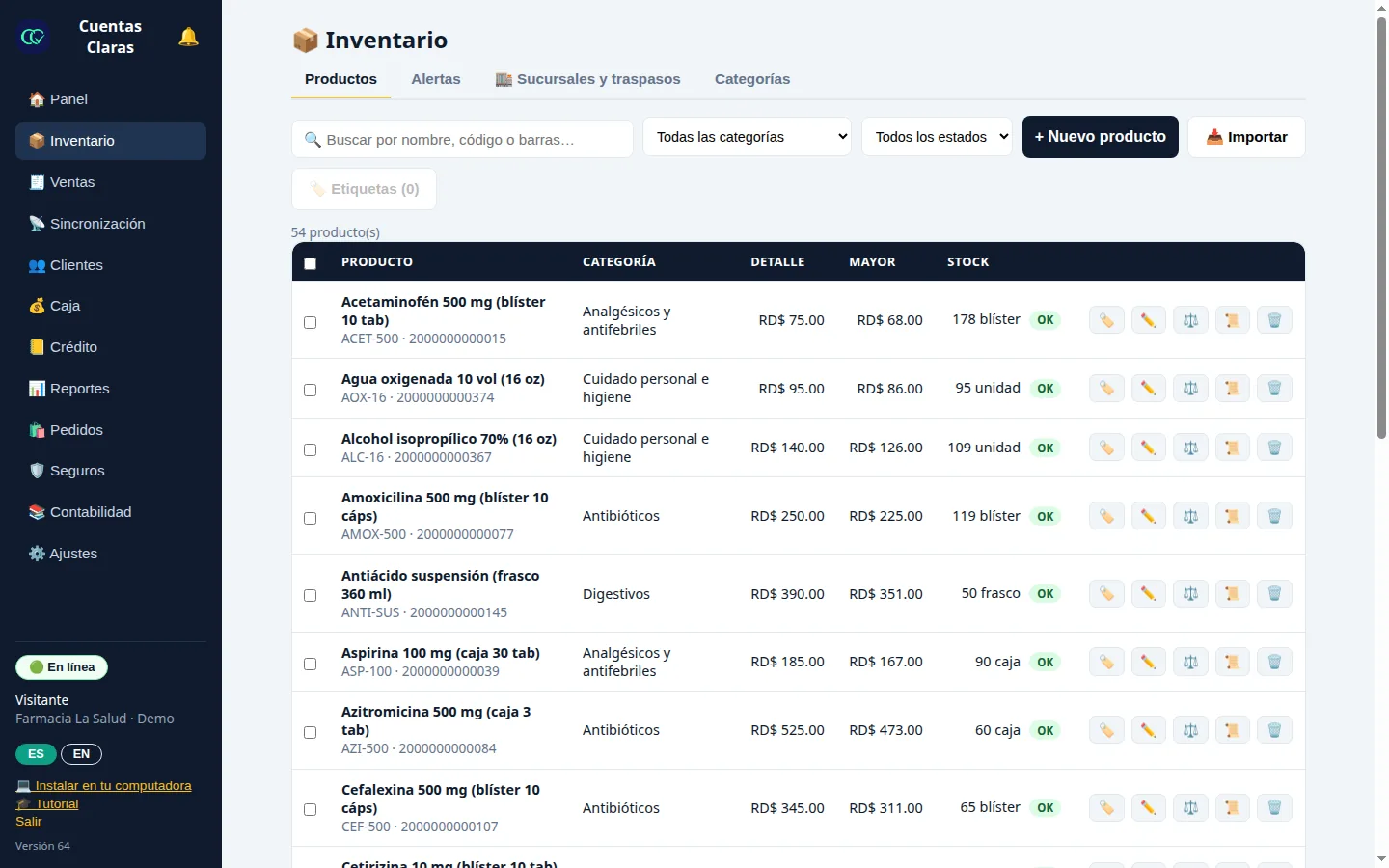
Control stock, costs, retail and wholesale prices, movements, and low-stock alerts.
Charge by cash, card or transfer, and inventory is deducted automatically.
Sales, profits, best sellers, expenses, and performance per employee.
Generate downloadable receipts ready to share with your customer.
Shift opening and closing, register differences, credit sales, payments, and pending balances.
We turn on the features that actually serve you and configure categories, fields, currency, users and permissions around how you work.
You know what you have, where it is and what's moving — by location, with no spreadsheets or notebooks.
Sizes, colors and tiered pricing, with your catalog ready to send on WhatsApp — sell even while you sleep.
Thousands of SKUs under control, with alerts before anything runs out.
No hassle: your products, your sales and your store credit, all from your phone.
Does your business work differently? First we assess your operation to tell you clearly what the platform can solve and how to configure it. No features you don't need.
Getting started is this simple: you sign up, we load your products with you, and your team learns inside the app itself. Four steps and you're selling.
Sign up in minutes and start your free 7-day trial, no card required. Your business gets its own account, with its data kept fully separate.
Import your list from Excel, CSV or a photo right from your own panel. If your plan includes setup, send it to us and we'll leave it loaded and organized.
We organize categories, fields, currency, users, roles and the modules for your type of business, based on how you really operate — not a generic template.
Everyone learns their flow with the tutorials built into the app — register, inventory, reports or administration — and we stay with you on WhatsApp throughout the process.
And if you ever decide to leave — no strings attached: you renew month to month and can cancel whenever you want; cancellation takes effect at the end of the period already paid, with no penalties. Your account stays in read-only mode with your information available, and you can take your monthly book, your reports and your accountant's package with you. The details are in the FAQ and the privacy policy.
Installation
Cuentas Claras installs from the browser, with no heavy downloads: it gets its own icon and its own window, like any program. The register computer is the main device; the owner's phone carries it installed to oversee the business.
Inside the app, the "Install on your computer" card shows these same steps for your browser.
The equipment your computer already recognizes, connected as always:
Print receipts, quotes, delivery notes and price labels with barcodes on your computer's printer. The receipt is sized for 80 mm and 58 mm thermal rolls.
USB and Bluetooth scanner guns work like a keyboard: aim, scan, and the product goes straight into the sale. Products without a manufacturer code get an internal code and a printed label from your inventory.
The drawer that connects to your receipt printer works right alongside it when you print, just like with your regular point of sale.
We detect your market automatically from your country and show you the plans that apply.
Features and pricing for each plan in your market, with the annual price already calculated.
| Feature | Personal | Negocio | Negocio Pro |
|---|---|---|---|
| Monthly price | RD$750 | RD$1,950 | RD$3,950 |
| Annual price · 2 months free | RD$7,500 | RD$19,500 | RD$39,500 |
| Profiles included | 1 | 5 · expandable to 7 | 10 |
| Locations included | 1 | 1 | 3 |
| Sales and inventory | ✓ | ✓ | ✓ |
| Customers and credit | ✓ | ✓ | ✓ |
| Credit reminders | — | ✓ | ✓ |
| Register closeout by shift | — | ✓ | ✓ |
| Tax receipts (NCF) | — | ✓ | ✓ |
| Reports | Basic | Profit | Profit |
| Locations with transfers between warehouses | — | — | ✓ |
| Priority support | — | — | ✓ |
| Extended training | — | — | ✓ |
Additional profile: RD$250/month · Additional location: from RD$500/month · One-time setup RD$4,500–7,500 depending on your inventory (free with the annual plan) · Annual billing: 2 months free · Setup free for businesses that sign up through November 30, 2026. The price shown is the final amount charged by Cuentas Claras.
The appointment book from Cuentas Claras: your clients book themselves from their phone through your link, picking from your real open slots with no double booking; you work the book on your computer and check it from your phone anytime. One flat monthly price, no commission per client and no message caps.
Features and pricing for each plan in your market, with the annual price already calculated.
| Feature | Personal | Negocio | Negocio Pro | Auto Lot |
|---|---|---|---|---|
| Monthly price | US$19 | US$39 | US$79 | US$59 |
| Annual price · 2 months free | US$190 | US$390 | US$790 | US$590 |
| Profiles included | 1 | 5 · expandable to 7 | 10 | — |
| Locations included | 1 | 1 | 3 | — |
| Point of sale and inventory | ✓ | ✓ | ✓ | ✓ |
| Customers and credit | ✓ | ✓ | ✓ | ✓ |
| Vehicle inventory (VIN, year, make, model) | — | — | — | ✓ |
| Register closeout by shift | — | ✓ | ✓ | — |
| Reports | Basic | Profit | Profit | Owner's |
| Bilingual ES/EN with support in Spanish | ✓ | ✓ | ✓ | — |
| Locations with transfers between warehouses | — | — | ✓ | — |
| Priority support | — | — | ✓ | — |
| Extended training | — | — | ✓ | — |
One-time setup US$199 · Setup and training included · Annual plan: 2 months free · Setup free for businesses that sign up through November 30, 2026.
$462.84 incl. VAT
$868.84 incl. VAT
$1,390.84 incl. VAT
Features and pricing for each plan in your market, with the annual price already calculated.
| Feature | Personal | Negocio | Negocio Pro |
|---|---|---|---|
| Monthly price | $399 + IVA | $749 + IVA | $1,199 + IVA |
| Annual price · 2 months free | $3,990 + IVA | $7,490 + IVA | $11,990 + IVA |
| Profiles included | 1 | 5 · expandable to 7 | 10 |
| Locations included | 1 | 1 | 3 |
| Point of sale and inventory | ✓ | ✓ | ✓ |
| Credit with payments | ✓ | ✓ | ✓ |
| Register closeout by shift | ✓ | ✓ | ✓ |
| Offline sales | ✓ | ✓ | ✓ |
| Owner reports | — | ✓ | ✓ |
| Wholesale and retail pricing | — | ✓ | ✓ |
| Per-location inventory with transfers | — | — | ✓ |
| Fiscal Module (CFDI) | $249/mo + IVA | $249/mo + IVA | Included |
| Priority support | — | — | ✓ |
Tax Module: $249 MXN/month + VAT on Personal and Business (included in Business Pro). Setup: free for businesses that sign up through November 30, 2026 — upload your product list from the app itself and we set it up for you. Support in Spanish, Monday to Saturday, 8 AM to 8 PM.
S/57.82 incl. VAT
S/140.42 incl. VAT
S/223.02 incl. VAT
Features and pricing for each plan in your market, with the annual price already calculated.
| Feature | Personal | Negocio | Negocio Pro |
|---|---|---|---|
| Monthly price | S/49 + IGV | S/119 + IGV | S/189 + IGV |
| Annual price · 2 months free | S/490 + IGV | S/1,190 + IGV | S/1,890 + IGV |
| Profiles included | 1 | 5 · expandable to 7 | 10 |
| Locations included | 1 | 1 | 3 |
| Point of sale and inventory | ✓ | ✓ | ✓ |
| Credit with payments | ✓ | ✓ | ✓ |
| Register closeout with Yape and Plin | ✓ | ✓ | ✓ |
| Batches, expirations and FEFO | — | ✓ | ✓ |
| Offline sales | ✓ | ✓ | ✓ |
| Owner reports | — | ✓ | ✓ |
| Wholesale and retail pricing | — | ✓ | ✓ |
| Per-location inventory with transfers | — | — | ✓ |
| Fiscal Module | S/39/mo + IGV | S/39/mo + IGV | Included |
| Priority support | — | — | ✓ |
Tax Module: S/39/month + VAT on Personal and Business (included in Business Pro): the “Documents to issue” queue that supports your invoicing in SUNAT’s SEE-SOL. Setup: free for businesses that sign up through November 30, 2026 — upload your product list from the app itself and we set it up for you. Support in Spanish, Monday to Saturday, 8 AM to 8 PM.
Q140 incl. VAT
Q334.88 incl. VAT
Q520.80 incl. VAT
Features and pricing for each plan in your market, with the annual price already calculated.
| Feature | Personal | Negocio | Negocio Pro |
|---|---|---|---|
| Monthly price | Q125 + IVA | Q299 + IVA | Q465 + IVA |
| Annual price · 2 months free | Q1,250 + IVA | Q2,990 + IVA | Q4,650 + IVA |
| Profiles included | 1 | 5 · expandable to 7 | 10 |
| Locations included | 1 | 1 | 3 |
| Point of sale and inventory | ✓ | ✓ | ✓ |
| Credit with payments | ✓ | ✓ | ✓ |
| Register closeout with Zigi and Tigo Money | ✓ | ✓ | ✓ |
| Batches, expirations and FEFO | — | ✓ | ✓ |
| Offline sales | ✓ | ✓ | ✓ |
| Owner reports | — | ✓ | ✓ |
| Wholesale and retail pricing | — | ✓ | ✓ |
| Per-location inventory with transfers | — | — | ✓ |
| Fiscal Module | Q99/mo + IVA | Q99/mo + IVA | Included |
| Priority support | — | — | ✓ |
Tax Module: Q99/month + VAT on Personal and Business (included in Business Pro): the “Documents to issue” queue that supports your FEL invoicing. Setup: free for businesses that sign up through November 30, 2026 — upload your product list from the app itself and we set it up for you. Support in Spanish, Monday to Saturday, 8 AM to 8 PM.
US$21.85 incl. VAT
US$40.25 incl. VAT
US$63.25 incl. VAT
Features and pricing for each plan in your market, with the annual price already calculated.
| Feature | Personal | Negocio | Negocio Pro |
|---|---|---|---|
| Monthly price | US$19 + IVA | US$35 + IVA | US$55 + IVA |
| Annual price · 2 months free | US$190 + IVA | US$350 + IVA | US$550 + IVA |
| Profiles included | 1 | 5 · expandable to 7 | 10 |
| Locations included | 1 | 1 | 3 |
| Point of sale and inventory | ✓ | ✓ | ✓ |
| Credit with payments | ✓ | ✓ | ✓ |
| Register closeout with De Una and Peigo | ✓ | ✓ | ✓ |
| Batches, expirations and FEFO | — | ✓ | ✓ |
| Offline sales | ✓ | ✓ | ✓ |
| Owner reports | — | ✓ | ✓ |
| Wholesale and retail pricing | — | ✓ | ✓ |
| Per-location inventory with transfers | — | — | ✓ |
| Fiscal Module | US$12/mo + IVA | US$12/mo + IVA | Included |
| Priority support | — | — | ✓ |
Tax Module: US$12/month + VAT on Personal and Business (included in Business Pro): invoicing before the SRI and the “Documents to issue” queue. Setup: free for businesses that sign up through November 30, 2026 — upload your product list from the app itself and we set it up for you. Support in Spanish, Monday to Saturday, 8 AM to 8 PM.
US$21.47 incl. VAT
US$39.55 incl. VAT
US$62.15 incl. VAT
Features and pricing for each plan in your market, with the annual price already calculated.
| Feature | Personal | Negocio | Negocio Pro |
|---|---|---|---|
| Monthly price | US$19 + IVA | US$35 + IVA | US$55 + IVA |
| Annual price · 2 months free | US$190 + IVA | US$350 + IVA | US$550 + IVA |
| Profiles included | 1 | 5 · expandable to 7 | 10 |
| Locations included | 1 | 1 | 3 |
| Point of sale and inventory | ✓ | ✓ | ✓ |
| Credit with payments | ✓ | ✓ | ✓ |
| Register closeout with Tigo Money, Chivo and Transfer365 | ✓ | ✓ | ✓ |
| Batches, expirations and FEFO | — | ✓ | ✓ |
| Offline sales | ✓ | ✓ | ✓ |
| Owner reports | — | ✓ | ✓ |
| Wholesale and retail pricing | — | ✓ | ✓ |
| Per-location inventory with transfers | — | — | ✓ |
| Fiscal Module | US$12/mo + IVA | US$12/mo + IVA | Included |
| Priority support | — | — | ✓ |
Tax Module: US$12/month + VAT on Personal and Business (included in Business Pro): the “Documents to issue” queue that supports your DTE invoicing in the Ministry of Finance system. Setup: free for businesses that sign up through November 30, 2026 — upload your product list from the app itself and we set it up for you. Support in Spanish, Monday to Saturday, 8 AM to 8 PM.
Gs. 108.900 incl. VAT
Gs. 240.900 incl. VAT
Gs. 361.900 incl. VAT
Features and pricing for each plan in your market, with the annual price already calculated.
| Feature | Personal | Negocio | Negocio Pro |
|---|---|---|---|
| Monthly price | Gs. 99.000 + IVA | Gs. 219.000 + IVA | Gs. 329.000 + IVA |
| Annual price · 2 months free | Gs. 990.000 + IVA | Gs. 2.190.000 + IVA | Gs. 3.290.000 + IVA |
| Profiles included | 1 | 5 · expandable to 7 | 10 |
| Locations included | 1 | 1 | 3 |
| Point of sale and inventory | ✓ | ✓ | ✓ |
| Credit with payments | ✓ | ✓ | ✓ |
| Register closeout with SIPAP and QR | ✓ | ✓ | ✓ |
| Batches, expirations and FEFO | — | ✓ | ✓ |
| Offline sales | ✓ | ✓ | ✓ |
| Owner reports | — | ✓ | ✓ |
| Wholesale and retail pricing | — | ✓ | ✓ |
| Per-location inventory with transfers | — | — | ✓ |
| Fiscal Module | Gs. 75.000/mo + IVA | Gs. 75.000/mo + IVA | Included |
| Priority support | — | — | ✓ |
Tax Module: Gs. 75.000/month + VAT on Personal and Business (included in Business Pro): the “Documents to issue” queue that supports your invoicing in the DNIT’s e-Kuatia’i. Setup: free for businesses that sign up through November 30, 2026 — upload your product list from the app itself and we set it up for you. Support in Spanish, Monday to Saturday, 8 AM to 8 PM.
₡7.345 incl. VAT
₡16.837 incl. VAT
₡25.877 incl. VAT
Features and pricing for each plan in your market, with the annual price already calculated.
| Feature | Personal | Negocio | Negocio Pro |
|---|---|---|---|
| Monthly price | ₡6.500 + IVA | ₡14.900 + IVA | ₡22.900 + IVA |
| Annual price · 2 months free | ₡65.000 + IVA | ₡149.000 + IVA | ₡229.000 + IVA |
| Profiles included | 1 | 5 · expandable to 7 | 10 |
| Locations included | 1 | 1 | 3 |
| Point of sale and inventory | ✓ | ✓ | ✓ |
| Credit with payments | ✓ | ✓ | ✓ |
| Register closeout with SINPE Móvil | ✓ | ✓ | ✓ |
| Batches, expirations and FEFO | — | ✓ | ✓ |
| Offline sales | ✓ | ✓ | ✓ |
| Owner reports | — | ✓ | ✓ |
| Wholesale and retail pricing | — | ✓ | ✓ |
| Per-location inventory with transfers | — | — | ✓ |
| Fiscal Module | ₡4.900/mo + IVA | ₡4.900/mo + IVA | Included |
| Priority support | — | — | ✓ |
Tax Module: ₡4.900/month + VAT on Personal and Business (included in Business Pro): the “Documents to issue” queue that supports your invoicing in Hacienda’s TicoFactura. Setup: free for businesses that sign up through November 30, 2026 — upload your product list from the app itself and we set it up for you. Support in Spanish, Monday to Saturday, 8 AM to 8 PM.
Straight answers to what every business asks before creating its account — no fine print.
Yes. The platform adapts to phone and computer, keeping the important features available on both. The main use is the computer at your register or counter, and your phone is your window to oversee the business from anywhere.
No. The platform is built for counter work: each person learns their flow with the step-by-step tutorials inside the app itself, by role, and our team stays with you on WhatsApp throughout the process.
You keep selling: offline mode stores movements on your device and syncs them automatically when the internet comes back. Just keep in mind that anything not yet synced lives only on that device, as explained in our privacy policy.
WhatsApp support Monday to Saturday, 8 AM–8 PM, in-app tutorials for every role, and hands-on help during setup. The Business Pro plan includes priority support.
Yes. Each person signs in with their own user and the permissions the owner defines. Every movement is tied to who made it.
Yes. If a product already has a manufacturer code, it can be scanned or typed in and linked. For products without a code, the platform can generate one.
Yes. Categories, fields, currency, logo, colors and modules can be adjusted. First we review your operation to recommend a useful, realistic setup.
Cuentas Claras operates in 10 markets: the Dominican Republic, the United States, Puerto Rico, Mexico, Peru, Guatemala, Ecuador, El Salvador, Paraguay and Costa Rica. You choose your market when you sign up, and the platform works with your currency, your taxes and your country's tax tools.
When you sign up, your business is active for 7 days with the features and limits of the plan you chose. We never ask for a card: if it's not for you, you pay nothing and there is no charge.
Your account switches to read-only mode: you can view all of your information, but you can't record changes until you activate your plan. Your data is never deleted, and when you activate your plan you pick up right where you left off.
Yes. The subscription renews month to month and you can cancel from your own panel (Plan & subscription section) — cancellation takes effect at the end of the period already paid, with no penalties. Afterwards your account stays in read-only mode with your information available to view.
Your data is yours. From the app you can download your monthly book and your reports, plus the monthly package for your accountant on the plans that include it. If you need a complete copy of your information, write to contacto@cuentasclarasrd.com and we'll send it to you.
In the Dominican Republic, your sales come out with their NCF receipt, the app generates your DGII reports 606, 607, 608 and the IT-1 sheet, and for electronic invoicing (e-CF) you have the bridge to the DGII's Facturador Gratuito (free invoicing tool): every sale is left prepared, you issue in the DGII portal and the e-NCF is recorded on your sale.
In the United States, every receipt applies the sales tax your business configures — its name and its rate — right on the sale.
In Puerto Rico, every sale breaks down its IVU per line — 11.5% general, with the special rates of 4% and 7% — and the app leaves your monthly report ready to upload and verify in SURI.
In Mexico, every sale generates its CFDI document and is ready to stamp from the sale itself; the stamping runs through the PAC and the document is recorded on your sale.
In Peru, the app leaves every sale ready to issue your boleta or invoice in SUNAT's SEE-SOL, and the receipt number is recorded on your sale.
In Guatemala, the app leaves every sale ready to issue your DTE in the SAT's FEL, and the authorization number is recorded on your sale.
In Ecuador, the app leaves every sale ready to issue your invoice in the SRI's «SRI y Yo» and the access key is recorded on your sale; and with your electronic signature loaded, the app builds, signs and sends the invoice to the SRI.
In El Salvador, the app leaves every sale ready to issue your DTE in the Ministry of Finance's Invoicing System, and the generation code is recorded on your sale.
In Paraguay, the app leaves every sale ready to issue your invoice in the DNIT's e-Kuatia'i, and the CDC is recorded on your sale.
In Costa Rica, the app leaves every sale ready to issue your tiquete or invoice in Hacienda's TicoFactura, and the numeric key is recorded on your sale.
We listen, review your operation, and show you how Cuentas Claras can help you organize it.
Message on WhatsApp